
6E Club Register – Complete Guide to Create Account (2026)
Creating a 6E Club account is the first step for every new player, and it takes about a minute when you know what each field expects.
This guide covers the platform in brief, the full 6E Club registration process, your first login, the app and the money basics you should understand before playing.
6E CLUB REGISTER SCREEN
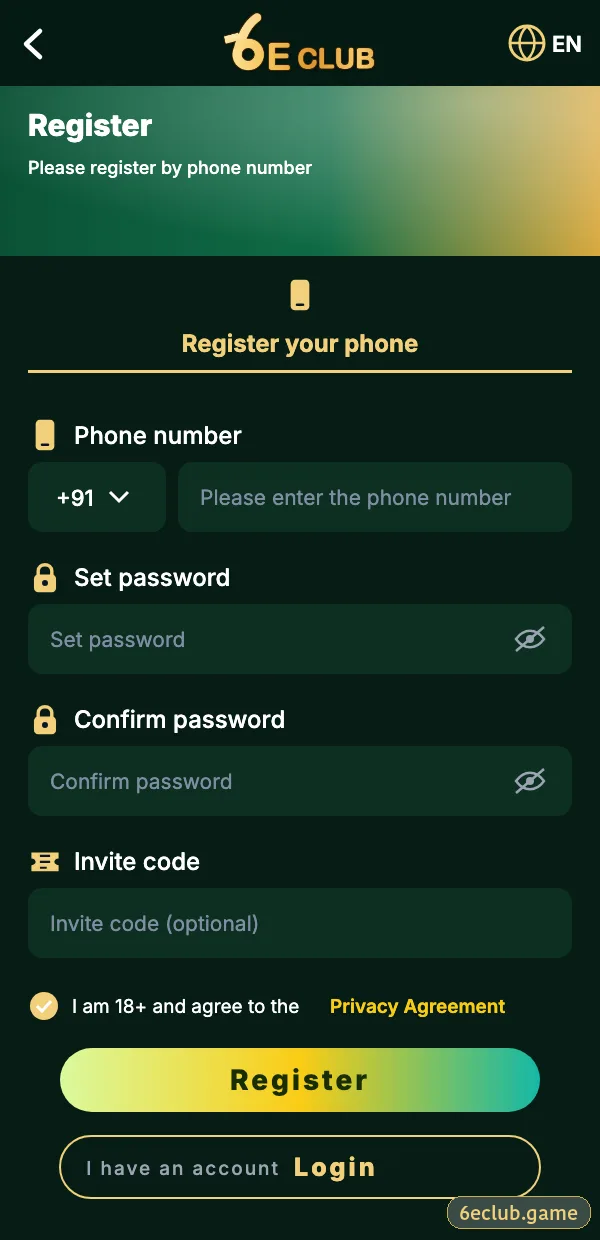
6E Club registration form
Phone number, password, confirm password, invite code and the 18+ agreement.
On this page
6E Club: a Newer Platform Growing Fast
6E Club arrived later than some older colour-prediction names, which shows in its design: a cleaner lobby, five WinGo timers and blockchain-checked Trx WinGo rounds. Much of its growth has come through invite links, so many people first hear about it from a friend and arrive at the register screen with an invite code already in hand.
What Is 6E Club?
6E Club is an online game platform for Indian adults built around colour prediction. One account and one wallet cover WinGo, Trx WinGo, K3, 5D, Aviator, slots, card tables and mini games. You can use it through the Android app, an iPhone web app or a normal browser.
Why Choose 6E Club?
- Quick sign-up with only a mobile number and a password.
- WinGo on 30 seconds, 1, 3, 5 and 10 minutes.
- Trx WinGo results you can verify on a public blockchain.
- UPI deposits that usually reflect within minutes.
- A clear record of every round and payment.
- Live chat support inside the app.
6E Club Register – Step-by-Step Guide
- Open the official 6E Club app or website – never a link from a chat.
- Tap Register and keep the +91 prefix.
- Type your ten-digit mobile number without a leading 0.
- Create a password of eight or more characters in Set password.
- Type it again in Confirm password – by hand, not by pasting.
- Paste an invite code if someone shared one; otherwise leave it blank.
- Tick the box confirming you are 18+ and accept the agreement.
- Tap Register, enter the SMS code, and the lobby opens.
What each field checks
| Field | Rule | Tip |
|---|---|---|
| Phone number | Indian mobile that receives SMS | Becomes your login ID |
| Set password | 8+ characters | Avoid names and birthdays |
| Confirm password | Must match exactly | Type it, do not paste |
| Invite code | Optional | Cannot be added later |
| Agreement | 18+ and terms | Required to submit |
Common registration errors
“Phone number already registered”
You already have an account – use login or forgot password.
SMS code not arriving
Check signal, DND and the active SIM, then wait for the timer before resending.
“Passwords do not match”
Retype both boxes by hand.
How to Do 6E Club Login After Registration
- Open the app or your bookmarked site.
- Tap Log in.
- Enter the number and password you just created.
- Tap Log in – no SMS code needed on the same phone.
Right after the first login, bind an email, switch on login alerts and change your nickname. These three steps take two minutes and protect the account from most problems.
6E Club App Download Guide
Android users install the 6E Club APK from the official website; iPhone users add the site to the Home Screen from Safari. The app keeps you signed in and avoids mistyped addresses. Step-by-step help: 6E Club app download.
Deposit and Withdrawal Basics
| Task | Methods | Note |
|---|---|---|
| Add money | UPI, QR, e-wallet, USDT | Minimum shown on the deposit page |
| Withdraw | Bank account, UPI, USDT | Account must be in your own name |
| Bonus balance | From rewards | Usually needs playthrough first |
Minimum amounts differ by channel and change from time to time, so the deposit and withdrawal pages inside the app are the only reliable source. Read 6E Club deposit and 6E Club withdrawal before your first payment.
After You Register: a Short Checklist
- Bind a backup email.
- Turn on login alerts.
- Set a withdrawal password.
- Add a bank account in your own name.
- Read the WinGo rules before your first round.
- Decide your weekly limit.
Registering on iPhone
On iPhone, open the official site in Safari, tap Register and follow the same fields. After registering, add the site to your Home Screen so the next login is one tap away.
Conclusion
6E Club registration is quick, but a few careful choices – your own number, a new password, the official app and the right invite code – make everything after it smoother. Take five extra minutes on security now and you will rarely need customer care later.
Start with 6E Club the safe way
Use the official 6E Club app or website – one 6E Club account works on every device.
Frequently asked questions
Is 6E Club registration free?
Yes.
Can I add an invite code after registering?
No – only on the register screen.
Can I register with an email?
Register with a mobile number, then bind an email.
Can I open two accounts?
No – one per person and number.